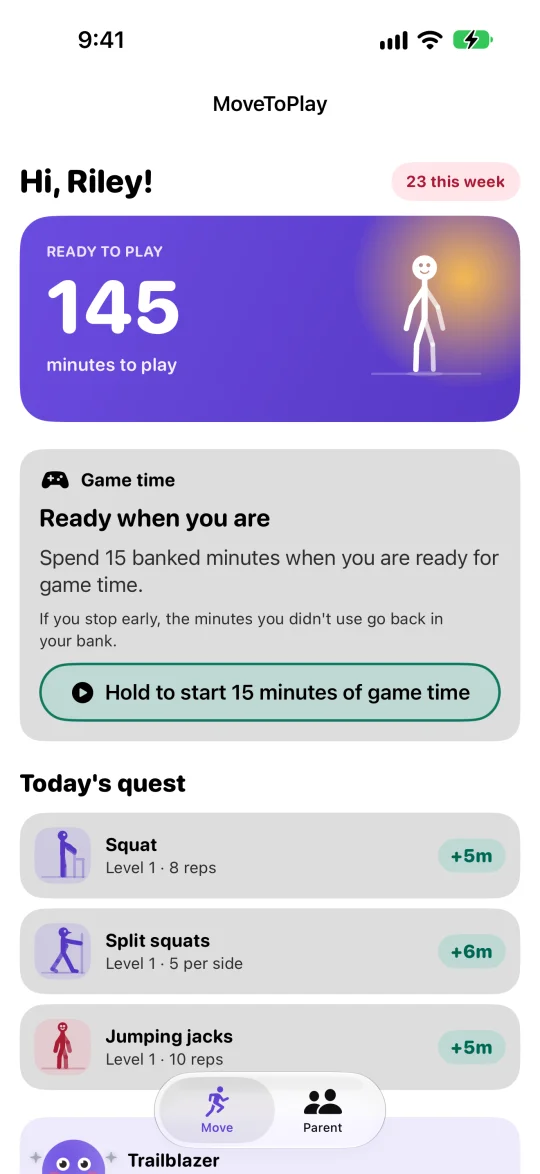
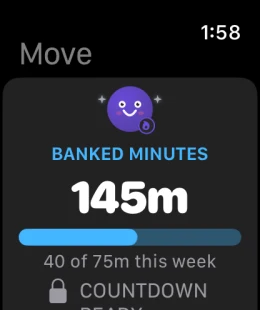
A screen time app for kids on iPhone, iPad and Apple Watch. Children earn screen time by exercising and doing chores you approve. Minutes go in the bank and never expire. On their iPhone or iPad, you can lock the apps you choose until that time has been earned.
App locking is optional and uses Apple’s Family Controls on iPhone and iPad. Apple Watch and Mac can’t lock apps. Questions parents ask · Press kit
Useful by design
Private by default
Made for families
Available now
MoveToPlay
A fitness-centered app that helps children earn and bank minutes through movement, recovery activities, and chores you approve — then spend them on play sessions or on rewards you choose. Read the step-by-step guide and parents’ questions, or our guides for parents on Apple’s Screen Time tools, chores for screen time and earning screen time with exercise.
Movement earns minutes
Each day the app picks three activities as Today’s Quest, from strength, cardio, mobility, balance and recovery, within the limits you set. Completing one banks minutes, and your child can swap an activity before starting it. With Apple Health steps on, walking earns minutes too. More
Chores earn minutes
Set what each chore is worth and how often it can come round again. Your child taps “I did it”, you approve, and the minutes are banked. Turn on proof and they add a photo or a short note first.
Minutes buy more than screen time
One currency, one bank. Minutes start a timed play session, or buy a real-world reward you price yourself: a movie night, a trip out, extra allowance. Banked minutes never expire, and unused minutes from a session ended early go straight back.
Parents stay in control
A dashboard behind your parent code. You set what chores and activities pay, which play session lengths exist, a weekly maximum on effort-earned minutes, and optional guaranteed daily minutes. Pause windows stop new sessions at bedtime or school; a running one ends early, minutes refunded, when MoveToPlay is open or next opened. More
Lock the apps you choose until time is earned
Optional, on iPhone and iPad. With “Lock selected apps” on and Apple’s Family Controls set up, the apps you pick stay blocked on your child’s device until a play session starts, and block again when the countdown reaches zero. Lock off, and sessions run on the honour system with a visible countdown.
Built for more than one child
Each child’s bank, quests, progression and rewards are separate, and the child-facing screens on a child’s device show only that child. A second parent can join with Family Sharing or a short pairing code, with no child Apple ID required.
Progress that's actually true
Exercises get harder after repeated “Easy” ratings and ease off after repeated “Too hard” ratings, with easier versions like a chair-supported squat. If something hurt, your child can say so, and you’ll see it. Calm Mode turns off celebrations and haptics for kids who find them too much.
Designed around Apple devices
iPhone and iPad (iOS 18 or later) and Apple Watch (watchOS 11 or later), with a Home Screen widget for the bank and a Lock Screen countdown during a session. Apple Watch can run play sessions but can’t lock apps. No Android version. On a Mac, see the note below.
Our approach
Technology should support family life—not compete with it.
MoveToPlay is built with clear parent controls, minimal personal information, and no ads. No fabricated streaks, no guilt messages, and nothing designed to pull a child back into the app.
Free to download, and setup is free. To use the app, a parent starts the Annual or Monthly Family subscription (new subscribers get a 2-week free trial, then it renews unless cancelled in Settings) or buys Lifetime once for $19.99 (US price). Lifetime and both subscriptions can be shared through Apple’s Family Sharing. No account or sign-up: a parent code is set on the device, and iCloud is optional, only used to keep a second device in sync.
The iPad version can also be downloaded from the Mac App Store on an Apple silicon Mac (macOS 15 or later). Apple lists it as designed for iPad and not verified for macOS, Mac use hasn’t been tested by us, and a Mac can’t lock apps. MoveToPlay by Duke & Duke is an Apple-only app and is not connected with the Android app at movetoplay.app.
Privacy and safety
The short answers for MoveToPlay: Earn Screen Time by Duke & Duke. The longer ones are in questions parents ask, the full wording is on our privacy page, and you can ask a person through the contact form.
Is MoveToPlay safe for kids? What data does it collect?
MoveToPlay: Earn Screen Time (by Duke & Duke, for iPhone, iPad and Apple Watch) is set up and supervised by a parent. There is no account and no sign-up, so there is no profile on our side; a parent sets a parent code on the device. The app handles what a family puts in: a nickname and broad age band but not an exact birth date, movement preferences and parent settings, completed activities and earned minutes, chores and rewards, optional Apple Health step counts, an optional photo or short note as chore proof, and which apps are selected for locking plus whether Apple's Family Controls is authorized on the device. In our privacy page's words, “The app keeps family data on the family's devices and, when enabled, in Apple's iCloud and CloudKit services for private synchronization.”
Does MoveToPlay track my child's location?
No. MoveToPlay: Earn Screen Time (by Duke & Duke) has no location entitlement, no location permission text and no Core Location code in it. There is no live location, no location history, no geofencing and no find-my-child feature.
Does MoveToPlay use the camera or microphone?
MoveToPlay: Earn Screen Time (by Duke & Duke) uses the camera for one thing only: a photo as proof a chore was done. It is off by default and set per chore by a parent. The child takes one picture in the app, it is never saved to Photos, the parent reviews it, and it is deleted automatically 14 days after a parent's decision, or 30 days after it was submitted if never reviewed (the next time the app runs after that). None of it reaches Duke & Duke: the photo stays on the family's own devices and, if iCloud sync is on, in the family's own private iCloud, which Apple does not give a developer access to. We run no server that receives chore photos, and the app does not analyse them at all. There is no camera-based rep counting. The microphone is not used at all: no microphone permission text and no audio recording.
Does MoveToPlay read my child's messages, browsing, or what they do in other apps?
No. MoveToPlay: Earn Screen Time (by Duke & Duke) cannot see messages, browsing history or what happens in other apps. The optional app lock uses Apple's Family Controls: a parent picks apps in Apple's own picker, and the app only receives Apple's opaque tokens, which it cannot read as app names or web addresses. It does not monitor app usage and keeps no inventory of what is installed.
Are there ads or third-party trackers?
No. Our privacy page: “The app does not contain ads or third-party ad networks.” MoveToPlay: Earn Screen Time (by Duke & Duke) has no advertising or analytics SDKs. Its privacy manifests set tracking to false and do not name any tracking domains, so it never asks for Apple's tracking permission. The App Store privacy label is separate: it lists Name, Health and Fitness as Data Linked to You, used for App Functionality. There are no third-party SDKs: purchases go through Apple's App Store only, and optional family iCloud sync is Apple's.
How do I delete our data?
MoveToPlay: Earn Screen Time (by Duke & Duke) has no account to close. Deleting the app removes the family data it kept on that device, and the parent code can be erased in the app through Forgot the code? If iCloud sync was on, the synced copy can be removed from your Apple Account's iCloud storage settings. Chore photos and notes delete themselves on their own timers, and a parent can delete one immediately. Our privacy page: “Parents may contact us to ask questions or request assistance with family data.”